
Download Eclips – Free Chrome Extension to Save Video Clips Quickly
Overview
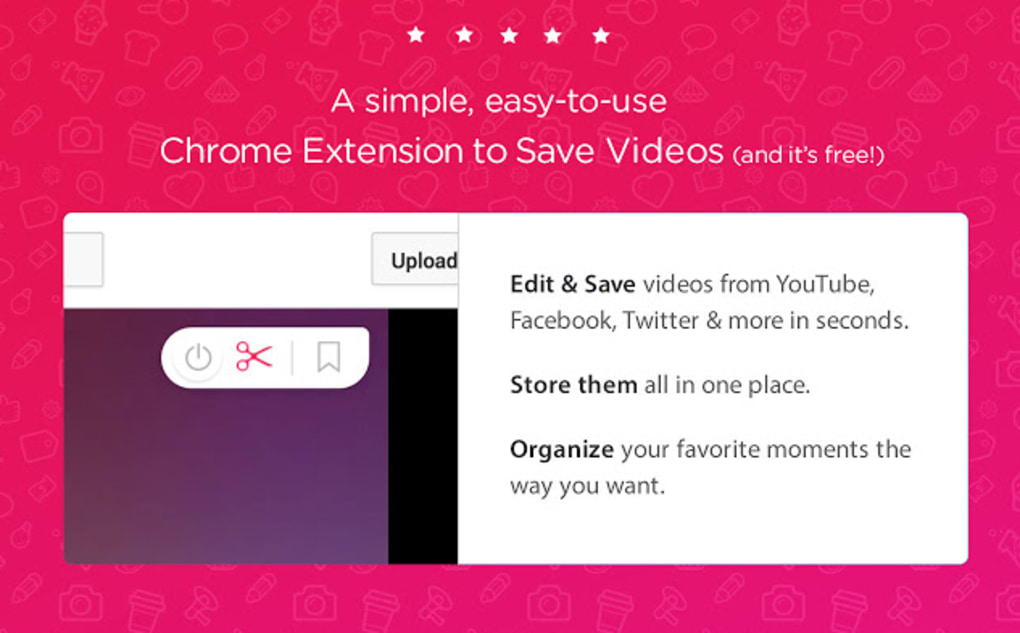
Eclips is a lightweight, free Chrome extension that lets you capture, trim, and store short video clips from the web without the hassle of traditional downloads. Whether you’re scrolling through funny memes on Facebook, following a tutorial on YouTube, or watching a viral TikTok‑style clip on Twitter, Eclips offers a “five‑second” workflow to save the exact segment you need. The tool creates a personal “clip library” inside your browser, so you can replay, share, or revisit saved moments without reopening the original page or enduring intrusive ads. Because it runs entirely inside Chrome, there’s no separate installer, no bulky desktop client, and no extra permissions beyond what the extension needs to read video streams. In short, Eclips turns any browser‑based video into a handy, searchable collection that lives locally in your profile, keeping the internet’s most entertaining and educational moments at your fingertips.
Key Features and Benefits
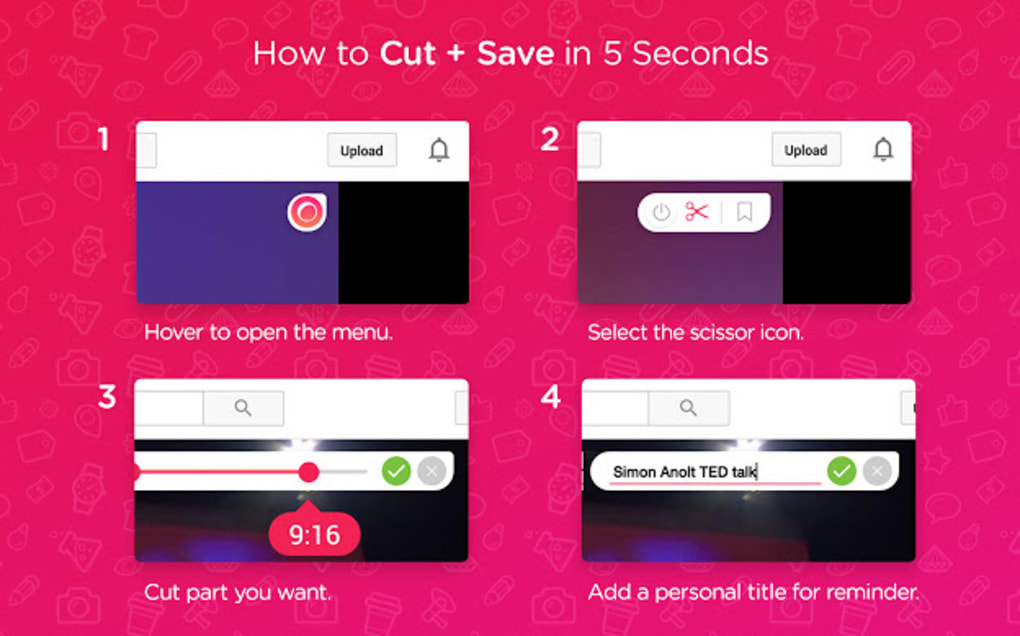
- Five‑Second Capture: One‑click scissors icon, a simple slider, and a “save” tick let you clip any portion of a video in under five seconds.
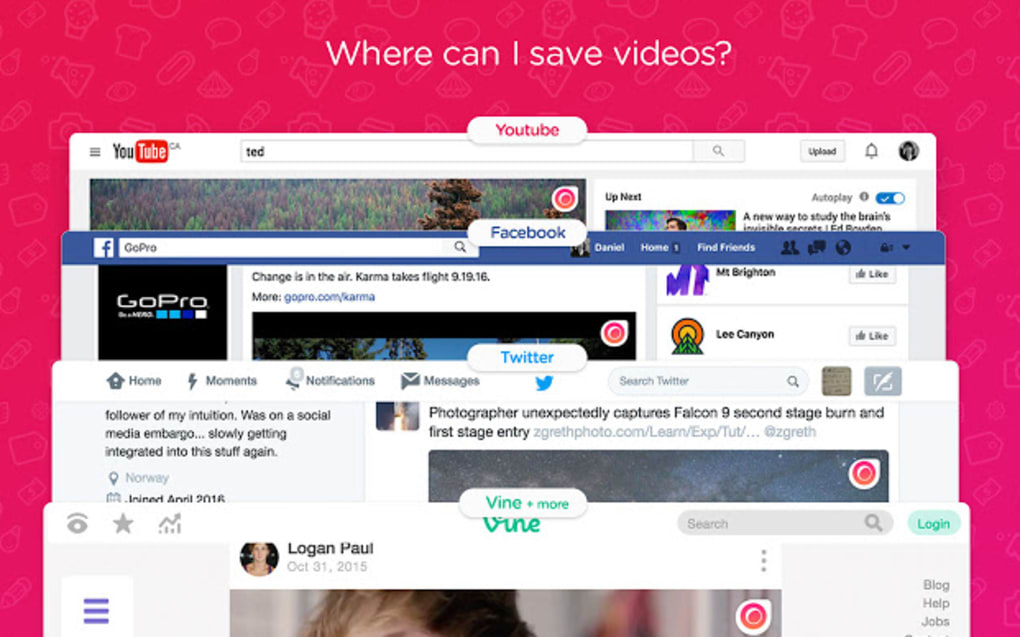
- Cross‑Platform Support: Works on any site that streams video in Chrome – YouTube, Facebook, Twitter, Instagram, TikTok, and more.
- In‑Browser Clip Library: Saved clips are stored within the extension, creating an instantly accessible collection without filling your hard‑drive.
- Trim & Preview: Adjust start and end points with a draggable slider, preview the result before saving, and ensure you capture exactly what you want.
- Share‑Ready Links: Each saved clip generates a shareable link that opens the clip directly from your library, perfect for messaging or social media.
- Zero‑Cost & No Ads: Eclips is completely free, with no hidden fees, premium tiers, or ad pop‑ups.
- Secure & Private: Clips never leave your browser unless you explicitly export them, protecting your data from third‑party servers.
- Automatic Updates: The extension receives silent updates through the Chrome Web Store, keeping features current without user intervention.
Beyond the raw feature list, Eclips shines because it eliminates the repetitive steps of copying URLs, opening new tabs, and dealing with download managers. The “clip‑first‑then‑share” model is especially valuable for educators who need to embed short demonstrations into presentations, marketers who want to showcase product snippets, and everyday users who simply love re‑watching a laugh‑out‑loud moment. By keeping everything inside Chrome, the tool also reduces the risk of malware that sometimes accompanies third‑party downloaders.
Installation, Usage & Compatibility
How to Install Eclips
Installing Eclips is a breeze. Open the Chrome Web Store, search for “Eclips – Save Video Clips,” and click the Add to Chrome button. Chrome will prompt you to confirm the required permissions (access to video streams on all sites). After accepting, the extension icon (a pair of scissors) appears next to the address bar. No additional software is required, and the installation process typically completes in under ten seconds.
Step‑by‑Step Usage Guide
- Navigate to a video: Open any page that contains a video you want to capture.
- Activate the cutter: Click the scissors icon in the toolbar. A small overlay appears on the video player.
- Select the segment: Drag the slider handles to define the start and end points. A live preview shows the exact clip.
- Save the clip: Click the green check‑mark. The clip is instantly added to your personal library, which you can open by clicking the Eclips icon again.
- Access & share: Inside the library, each clip displays a thumbnail, duration, and a share button that copies a direct link to the clipboard.
System Requirements & Operating Systems
Eclips is built exclusively for the Google Chrome browser, which is available on Windows 10/11, macOS 10.14+ (Catalina and later), Linux distributions that support Chrome, and Chrome OS. Because it runs as a browser extension, there are no separate mobile versions for Android or iOS; however, Chrome on Android and iOS can load the extension through the desktop‑mode remote‑debug feature, though the full UI is optimized for desktop browsers.
Performance impact is minimal. The extension consumes less than 10 MB of RAM and negligible CPU when idle. When clipping, the processing load is momentary and typically unnoticed on modern hardware. Users on older machines may experience a slight lag if they attempt to clip high‑resolution (4K) streams, but the trimmed clip is stored at the original resolution, ensuring quality is preserved.
Pros, Cons, FAQ & Review
Pros & Cons
- Pros:
- Lightning‑fast five‑second clipping workflow.
- Free, ad‑free, and no hidden fees.
- Secure, local storage – no cloud uploads.
- Works on virtually any video‑hosting site.
- Automatic updates via Chrome Web Store.
- Cons:
- No built‑in option to download the clip as an MP4 file (requires manual export).
- Limited to Chrome; not available as a standalone desktop app.
- Clip library is tied to the browser profile – switching devices requires re‑installing and re‑capturing.
Frequently Asked Questions
Is Eclips really free?
Yes. Eclips is 100 % free to download and use. There are no premium tiers, no in‑app purchases, and no ads.
Can I export a saved clip to my hard drive?
The current version stores clips only within the extension. You can right‑click a thumbnail and select “Save video as…” to download the original source, or use a third‑party tool to export the clip if needed.
Does Eclips work on mobile browsers?
Eclips is designed for desktop Chrome. While Chrome on Android and iOS can load extensions via remote debugging, the full UI and shortcut keys are optimized for a desktop environment.
Is my privacy protected?
Yes. Clips never leave your browser unless you share a link. Eclips does not collect personal data beyond the minimal permissions needed to access video streams.
How often does Eclips receive updates?
Updates are pushed automatically through the Chrome Web Store, typically every few weeks to address compatibility with new video platforms and to add minor enhancements.
User Review
The overall user sentiment for Eclips is highly positive. Reviewers praise the speed of clipping, the simplicity of the interface, and the fact that it eliminates ad‑filled download pages. While a few users wish for a native download option, the majority agree that the built‑in library meets their day‑to‑day needs. On a scale of 1‑5, Eclips averages a rating of 4.6, reflecting both its utility and its lightweight design.
Conclusion & Call to Action
If you spend any amount of time watching short videos online, Eclips is the tool that turns those fleeting moments into a personal archive you can revisit at any time. Its five‑second clipping workflow, secure local storage, and cross‑site compatibility make it a must‑have for creators, educators, marketers, and casual browsers alike. While the lack of a direct download button may be a minor inconvenience for power users, the overall experience remains smooth, fast, and completely free. Ready to stop chasing URLs and start building your own video clip library? Download Eclips now from the Chrome Web Store and start saving your favorite moments in seconds.